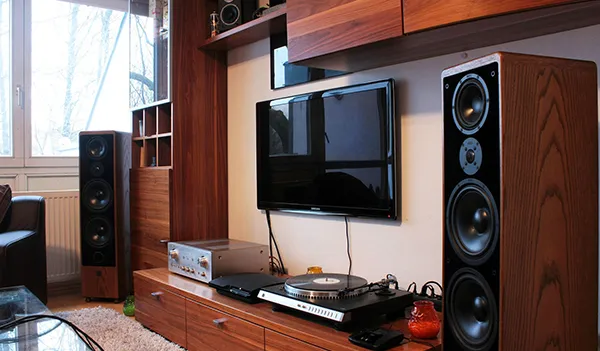
Modern homes offer more ways to enjoy entertainment and manage everyday tasks. From listening to music to adjusting lighting, technology can make daily routines easier.
However, choosing the right equipment requires careful planning. Poor speaker placement can affect sound quality. Incompatible smart devices can also create frustrating control problems.
Homeowners benefit from understanding how these systems work. They can then make informed decisions about equipment, installation, and future upgrades.
J P Electronics & Surveillance provides electronic installation services, including sound systems and home automation. The company helps homeowners explore technology solutions for their properties.
This guide explains audio system planning, smart home features, installation considerations, and common mistakes to avoid.
Understanding Modern Home Entertainment Systems
Home entertainment systems bring audio equipment together for convenient listening. Depending on the design, a system might include speakers, amplifiers, receivers, and control devices.
Some homeowners want better television sound. Others prefer music throughout several rooms or outdoor entertainment areas.
The right setup depends on your property and listening habits. Room size, layout, existing wiring, and equipment compatibility all influence the design.
A well-planned system should deliver consistent performance without complicating everyday use.
Choosing Between Different Audio Setups
Different systems serve different purposes. Understanding their strengths helps homeowners choose suitable equipment.
Stereo systems: These systems use separate audio channels to create a balanced listening experience. They can work well in living rooms, bedrooms, and dedicated music spaces.
Surround sound systems: Multiple speakers create a more immersive experience for movies and television. Correct placement helps create convincing directional effects.
Multi-room audio: This arrangement distributes music across several rooms. Users may listen to the same music throughout the home or choose different audio in individual spaces.
Outdoor audio: Weather-resistant equipment supports music in suitable outdoor areas. Speakers need appropriate placement and protection against environmental exposure.
Consider how you intend to use the system. This helps prevent unnecessary equipment purchases.
Why Professional Sound Installation Matters
Installing audio equipment involves more than connecting speakers. The installer must consider room acoustics, wiring, equipment compatibility, and listening positions.
Professional planning can help address these details before installation begins.
Speaker Placement Affects Sound Quality
Speakers perform differently depending on their location. Walls, ceilings, furniture, and room dimensions can influence how sound travels.
Placing speakers too close to corners may exaggerate certain frequencies. Poor positioning can also create uneven volume throughout a room.
An installation professional can assess the space. They can recommend speaker locations that suit the room’s layout and intended use.
Equipment Compatibility Prevents Problems
Audio systems often combine several components. These may include televisions, streaming devices, receivers, amplifiers, and speakers.
Not every component works with every other device. Checking specifications before purchasing helps avoid compatibility problems.
Consider the available connections and supported audio formats. Also confirm that the amplifier can safely power the selected speakers.
Concealed Wiring Creates a Cleaner Finish
Visible cables can make entertainment areas look cluttered. Concealed wiring offers a cleaner appearance when the property allows it.
New construction often provides opportunities for planned cable routes. Existing homes may require careful installation to minimise disruption.
Discuss wall construction and access before work begins. Some installations may need additional preparation or specialised materials.
Homeowners considering Sound System Installation in Jupiter, Fl should evaluate room size, equipment requirements, and wiring options before selecting a setup.
Planning Audio for Indoor and Outdoor Spaces
A home’s entertainment needs often extend beyond the living room. Kitchens, bedrooms, patios, and poolside areas may also benefit from audio.
However, each location presents different requirements.
Indoor Audio Planning
Start by identifying the rooms where you want sound. Decide whether each room needs independent volume control.
Consider how people use these spaces. A kitchen may need background music, while a home theatre requires more immersive audio.
Discuss speaker visibility and interior design preferences. Some homeowners prefer visible speakers, while others favour discreet installations.
Outdoor Audio Planning
Outdoor entertainment areas require suitable equipment. Speakers must withstand the conditions specified by their manufacturer.
Consider rain exposure, humidity, direct sunlight, and nearby landscaping. Professional placement can help distribute sound without concentrating it in one area.
Also consider neighbours and local noise requirements. A good design balances entertainment needs with considerate sound levels.
Planning for Future Expansion
Your requirements may change over time. You might later add a patio, renovate a room, or expand your entertainment system.
Planning cable routes and equipment capacity can simplify future upgrades. Ask whether the proposed design supports additional speakers or control zones.
This approach can reduce the need for extensive modifications later.
What Is Home Automation?
Home automation connects compatible devices and allows users to control them through coordinated interfaces or programmed routines.
Depending on the equipment, a system may manage lighting, climate, entertainment, security, and other household functions.
Some systems use mobile applications. Others include wall-mounted controls, remotes, sensors, or voice commands.
The goal is to simplify everyday tasks. However, successful automation depends on thoughtful system design and reliable connections.
Smart Lighting
Smart lighting allows users to adjust compatible lights through controls or schedules.
You might dim lights for a film or brighten a room for reading. Automated schedules can also switch selected lights on or off.
Before choosing equipment, check compatibility with existing switches and wiring. Some installations may require electrical work by a qualified professional.
Climate Control
Compatible thermostats can help homeowners manage heating and cooling settings. Scheduling may make temperature adjustments more convenient.
Some systems support remote control through an application. Actual capabilities depend on the thermostat, HVAC equipment, and network connection.
Automation does not guarantee lower energy bills. Savings depend on usage habits, settings, equipment efficiency, and local conditions.
Security Integration
Some automation systems connect compatible cameras, sensors, alarms, and smart locks.
This integration can make selected security functions easier to manage. For example, a homeowner might receive an alert when a connected sensor detects activity.
However, features vary by system. Homeowners should understand privacy settings, network security, and access permissions before enabling remote control.
Entertainment Control
Integrated entertainment controls can simplify the use of compatible devices.
A single interface may manage television functions, audio zones, and other supported equipment. This can reduce the number of remotes needed around the home.
Check compatibility before selecting a control platform. Confirm that the system supports the devices you already own.
How to Plan a Smart Home System
Start with your daily routines rather than a list of gadgets. Identify tasks that genuinely need simpler control.
You may want easier lighting adjustments or better coordination between entertainment devices. Another household might prioritise climate control and security alerts.
Once you understand these needs, select suitable technologies.
Make a List of Priorities
Separate essential features from optional upgrades. This helps keep the project focused.
For example, you might begin with lighting and audio. You could add other compatible features later.
Prioritising the most useful functions helps control costs. It also makes the finished system easier to learn.
Check Your Network
Many smart devices rely on a stable home network. Weak wireless coverage can affect responsiveness and reliability.
Consider the size of your property and the number of connected devices. Larger homes may require additional network equipment.
Ask your installer to identify potential coverage problems. Reliable connectivity supports a smoother automation experience.
Consider Ease of Use
A system should suit everyone who needs to operate it. Complicated controls can reduce the benefits of automation.
Choose clear interfaces and sensible control arrangements. Label important functions where appropriate.
Test the proposed controls before finalising the installation. Make sure household members understand the main features.
Review Privacy and Security
Connected devices may collect information or provide remote access. Protecting these systems requires appropriate security practices.
Use strong, unique passwords and enable multifactor authentication where available. Keep device software updated and remove access that people no longer need.
Review privacy settings before activating cameras or voice-controlled equipment. Understand how each manufacturer handles data.
Common Home Automation Mistakes
Homeowners can avoid many problems through better preparation.
Buying incompatible devices: Check supported platforms and technical requirements before purchasing equipment.
Ignoring network limitations: Assess wireless coverage before adding numerous connected devices.
Automating everything immediately: Begin with useful functions and expand after learning how the system performs.
Overlooking installation requirements: Some devices need suitable wiring, professional configuration, or additional equipment.
Forgetting future support: Confirm how updates, troubleshooting, and equipment replacement will work.
Choosing complexity over convenience: Select features that solve real problems instead of adding unnecessary controls.
A carefully planned system often serves homeowners better than a collection of disconnected gadgets.
Choosing an Installation Professional
The installer you choose can influence the system’s reliability and usability. Compare providers based on their services and approach.
Ask about experience with your preferred equipment. Discuss installation methods, expected timelines, and any preparation your property requires.
Request a clear estimate covering labour and equipment. Confirm whether programming, testing, and user guidance are included.
Also discuss warranties and future support. Written details help you understand the arrangement before approving the work.
J P Electronics & Surveillance offers sound system installation and home automation services. Homeowners can contact the company to discuss their requirements and explore suitable solutions.
For homeowners researching Home Automation Installation Services in Stuart, Fl, a consultation can help identify useful features, compatible equipment, and practical installation requirements.
What to Expect During Installation
A well-organised installation generally begins with a discussion of your goals. The installer assesses the property and reviews the proposed equipment.
The next steps depend on the project’s complexity.
Initial Assessment
The installer reviews room layouts, existing wiring, network coverage, and equipment requirements.
This stage helps identify potential obstacles. It also provides an opportunity to discuss budget and priorities.
Equipment Installation
Technicians install the agreed equipment and associated connections. Work may involve mounting speakers, routing cables, or configuring compatible devices.
The installation method depends on the property and chosen system.
Configuration and Testing
After installation, the system needs appropriate configuration. The technician should test key functions and identify any problems.
Audio systems should be checked for sound quality and control responsiveness. Automation systems should be tested across their agreed functions.
Customer Guidance
Homeowners should understand how to operate their new equipment. Ask the installer to demonstrate the main controls.
Request any relevant documentation and support information. This makes future adjustments and troubleshooting easier.
Frequently Asked Questions
Do I need professional installation for home audio?
Not every audio setup requires professional assistance. However, complex wiring, multi-room audio, and integrated systems may benefit from professional planning.
Can I control multiple rooms with one audio system?
Yes, suitable multi-room systems can distribute audio across different spaces. The available controls depend on the equipment and system design.
Can home automation work with existing devices?
Some existing devices support integration with compatible automation platforms. Check the specific models and connection requirements before planning the system.
Does smart home automation require Wi-Fi?
Many smart devices use Wi-Fi, but others rely on wired connections or dedicated communication protocols. The requirements depend on the selected equipment.
Can I expand my system later?
Many systems support future expansion, although compatibility and equipment capacity vary. Discuss potential upgrades before finalising your initial installation.
What should I ask before booking an installer?
Ask about experience, equipment compatibility, installation costs, timelines, warranties, and support. Confirm which services the quoted price includes.
Conclusion
Modern audio and automation systems can improve everyday convenience. Their success depends on appropriate equipment, thoughtful planning, and reliable installation.
Start by identifying your priorities and reviewing your property’s requirements. Compare suitable solutions before committing to major upgrades.
A well-planned system should fit your lifestyle. It should make everyday technology easier to enjoy and manage.