Construction companies rely on trucks, service vehicles, dump trucks, and other heavy-duty vehicles to keep projects moving. When one of these vehicles breaks down unexpectedly, it can delay work, disrupt schedules, and put additional pressure on maintenance teams. Managing multiple vehicles through spreadsheets, paper records, or manual reminders makes it even harder to keep operations organized.
Construction vehicle maintenance software helps contractors and fleet managers streamline maintenance activities, schedule preventive services, track repairs, and maintain accurate vehicle records. By centralizing maintenance information, businesses can make better decisions, reduce avoidable downtime, and keep their construction fleets operating more reliably.
Whether a company manages a small fleet of work trucks or a large collection of construction vehicles, adopting a structured maintenance management system can improve operational efficiency and support long-term fleet performance.
What Is Construction Vehicle Maintenance Software?
Construction vehicle maintenance software is a digital solution that helps businesses manage the servicing, inspection, repair, and maintenance history of their construction vehicles. It provides a centralized place to record vehicle information, organize maintenance schedules, track repair orders, and monitor upcoming service requirements.
Unlike basic spreadsheets, dedicated fleet maintenance software can help teams organize recurring maintenance tasks and access vehicle records without searching through multiple documents.
Depending on the platform, common capabilities may include:
- Preventive maintenance scheduling based on mileage, engine hours, or time intervals.
- Vehicle inspection and maintenance checklists.
- Repair order and work order management.
- Service history and maintenance record tracking.
- Parts inventory and repair documentation.
- Maintenance reminders and reporting.
- Fleet performance and downtime monitoring.
These features help maintenance managers coordinate work more effectively while giving fleet owners greater visibility into vehicle conditions and service requirements.
Why Construction Companies Need Vehicle Maintenance Software
Construction fleets often operate under demanding conditions. Vehicles may travel across rough terrain, carry heavy loads, operate in dusty environments, and work long shifts. These conditions can accelerate wear on tires, brakes, suspension systems, engines, and other critical components.
Without a consistent maintenance process, small mechanical issues can develop into expensive repairs or unexpected breakdowns.
1. Prevent Unexpected Vehicle Breakdowns
Unexpected breakdowns can interrupt material deliveries, delay construction activities, and leave workers waiting for equipment or transportation. A structured maintenance program helps teams identify service requirements before minor problems become major disruptions.
Construction vehicle maintenance software allows managers to schedule inspections, record recurring issues, and review previous repairs. When maintenance tasks are planned and documented, teams can address potential problems earlier and make more informed repair decisions.
2. Organize Preventive Maintenance Schedules
Preventive maintenance is essential for extending vehicle service life and maintaining reliable fleet operations. However, managing different service intervals across a mixed fleet can become complicated.
Some vehicles require servicing based on mileage, while certain equipment and heavy-duty vehicles may depend on engine hours or manufacturer-recommended intervals.
Fleet maintenance management software helps managers organize these requirements in one system. Automated reminders, where available, can notify the appropriate team when a vehicle approaches its next service interval.
This approach reduces reliance on memory and makes it easier to maintain consistent service schedules across the fleet.
3. Improve Maintenance Recordkeeping
Accurate maintenance records help businesses understand vehicle performance, recurring mechanical problems, and previous repair work. These records are also useful when evaluating whether a vehicle should be repaired, replaced, or assigned to different duties.
Digital vehicle maintenance logs can include inspection results, repair dates, parts used, technician notes, and upcoming service requirements. Having this information available in one place improves communication between fleet managers, mechanics, and operations teams.
Better documentation also supports maintenance planning and helps businesses establish more consistent internal procedures.
Essential Features of Construction Vehicle Maintenance Software
Not every maintenance platform offers the same functionality. Construction businesses should evaluate their fleet size, vehicle types, workshop processes, and reporting requirements before selecting a solution.
Preventive Maintenance Scheduling
Preventive maintenance scheduling helps managers plan oil changes, filter replacements, tire inspections, brake checks, and other routine services.
A capable system should support maintenance intervals relevant to the vehicles being managed. Mileage-based and engine-hour-based tracking can be particularly useful for construction fleets because vehicles and equipment may operate under very different conditions.
The goal is to schedule maintenance around actual service requirements rather than relying entirely on fixed calendar reminders.
Work Order and Repair Management
Work order management helps maintenance teams document reported problems, assign repair tasks, and track work from initial diagnosis to completion.
For example, if a dump truck develops a braking issue, a manager can create a repair order, record the reported symptoms, assign the job to a technician, and document the parts and labor involved.
A centralized workflow makes it easier to understand which vehicles are awaiting inspection, undergoing repairs, or ready to return to service.
Vehicle Inspection Management
Regular inspections help identify visible damage, fluid leaks, tire wear, lighting problems, and other maintenance concerns before vehicles return to demanding working conditions.
Digital inspection tools can help standardize checklists and record findings consistently. Depending on the software, teams may also be able to attach photographs, assign corrective actions, and retain inspection records.
Businesses should select inspection workflows that align with applicable safety requirements and their own operating procedures.
Service History Tracking
A complete service history allows managers to review recurring faults, previous repairs, and maintenance intervals for individual vehicles.
This information can reveal patterns that may otherwise go unnoticed. For example, repeated cooling system repairs on one truck may indicate a recurring mechanical issue that deserves further investigation.
With reliable service history tracking, maintenance teams can make decisions using documented information instead of incomplete records or assumptions.
Parts and Inventory Management
Repair delays sometimes occur because the required replacement parts are unavailable. Inventory management features can help workshops track commonly used components, monitor stock levels, and record parts consumed during repairs.
For construction fleets that maintain their own workshops, this capability can improve parts planning and coordination between technicians and purchasing teams.
Integration with purchasing or accounting systems may also be available, depending on the software provider.
Reporting and Maintenance Analytics
Maintenance reports help businesses evaluate fleet reliability and identify opportunities to improve their processes.
Useful metrics may include vehicle downtime, preventive maintenance completion rates, repair frequency, recurring faults, and maintenance spending per vehicle.
Managers can use these insights to identify underperforming assets, review maintenance schedules, and prioritize vehicles that require additional attention.
How Construction Vehicle Maintenance Software Reduces Downtime
Vehicle downtime affects more than the repair itself. A disabled truck may delay deliveries, disrupt project schedules, require a replacement vehicle, or create additional coordination work for supervisors.
Maintenance software can help reduce avoidable downtime through a more organized workflow.
First, preventive maintenance schedules make upcoming service requirements visible. Managers can plan workshop time around project demands rather than waiting for a vehicle to fail.
Second, digital repair orders help teams communicate reported problems and assign work more efficiently. Technicians can access relevant service information and document repairs in a consistent format.
Third, maintenance history helps identify repeated mechanical problems. When a fault occurs frequently, managers can investigate its underlying cause instead of repeatedly addressing the same symptoms.
Finally, reporting helps fleet managers identify patterns in vehicle availability and repair frequency. Although software cannot eliminate every breakdown, it can provide the information needed to make maintenance more proactive.
Benefits for Construction Fleet Managers and Contractors
Implementing construction vehicle maintenance software can provide several operational advantages.
- Better fleet visibility: Managers can review maintenance status and service history without collecting information from multiple spreadsheets or paper files.
- More consistent servicing: Scheduled reminders and documented maintenance procedures help teams keep routine tasks organized.
- Improved workshop coordination: Repair orders and technician assignments make it easier to track ongoing maintenance work.
- More informed replacement decisions: Historical repair information helps managers assess whether recurring problems justify further repairs or vehicle replacement.
- Stronger maintenance accountability: Digital records make it easier to determine which work has been completed and which tasks remain outstanding.
- Improved resource planning: Maintenance reports can help businesses coordinate technician availability, replacement parts, and workshop capacity.
The value of these benefits depends on how consistently a company records information and uses the software as part of its maintenance process.
How to Choose the Right Construction Vehicle Maintenance Software
Selecting the right platform requires more than comparing feature lists. Businesses should focus on whether a solution supports their real-world fleet operations.
Evaluate Fleet Compatibility
Start by identifying the vehicles and equipment that need to be managed. A construction company may operate pickup trucks, dump trucks, service vans, trailers, and specialized heavy-duty vehicles.
Confirm that the platform can store relevant asset information and track the maintenance intervals required by each vehicle type.
Check Scheduling and Notification Options
Look for flexible preventive maintenance schedules, recurring service reminders, and support for mileage or engine-hour tracking where necessary.
These capabilities are particularly valuable for mixed fleets operating across multiple construction sites.
Review Repair Workflow Features
If your business operates an in-house repair shop, consider whether the software supports work orders, technician assignments, repair documentation, and parts tracking.
Businesses that outsource most repairs may need a simpler system focused on maintenance schedules, inspections, and service records.
Examine Reporting Capabilities
Choose a solution that provides useful maintenance reports without requiring extensive manual data collection. Fleet managers should be able to identify overdue services, recurring problems, and vehicles experiencing excessive downtime.
Consider Ease of Use and Integration
Maintenance software is only effective when employees use it consistently. An intuitive interface, suitable mobile access, and practical reporting tools can help encourage adoption.
Also, determine whether the platform integrates with existing fleet tracking, accounting, inventory, or business management systems. Confirm integration availability with the vendor before making a purchase decision.
The Role of Fleet Maintenance Software in Modern Construction Operations
As construction businesses manage increasingly complex fleets, digital maintenance systems are becoming an important part of operational planning.
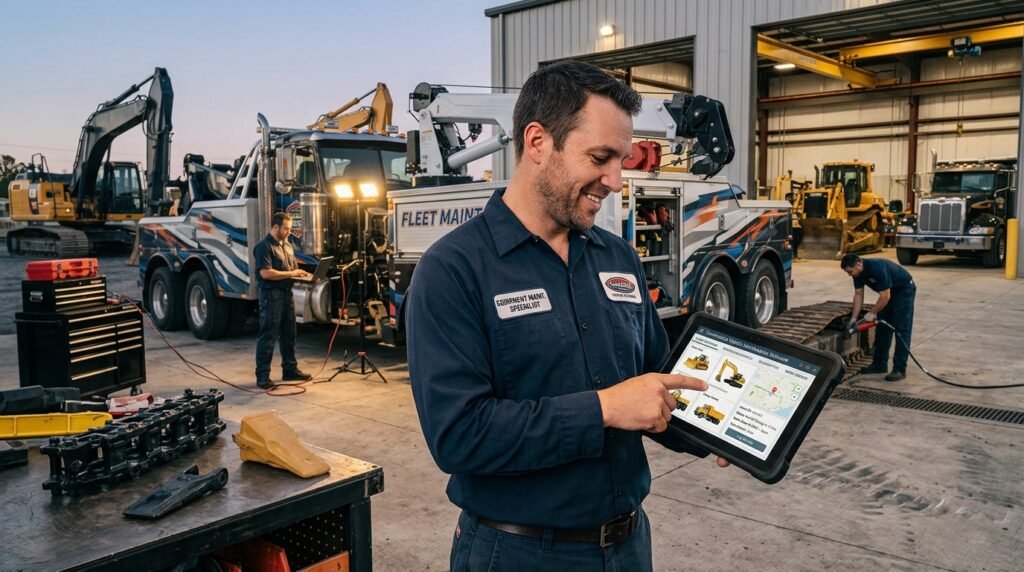
Platforms such as Fullbay illustrate how maintenance and repair management tools can support organized service workflows, repair documentation, and better visibility into heavy-duty vehicle maintenance.
For construction companies with in-house maintenance teams, a dedicated system can connect service schedules, repair activities, and vehicle records in a more consistent workflow. Managers can then use this information to coordinate maintenance with project timelines and fleet availability.
However, successful implementation also requires clear procedures, accurate data entry, and defined responsibility for reviewing maintenance alerts. Software provides the structure, while maintenance teams ensure that inspections and repairs are completed correctly.
Final Thoughts
Construction vehicle maintenance software helps contractors and fleet managers organize preventive maintenance, coordinate repairs, maintain service histories, and monitor vehicle performance. By replacing fragmented records with a structured digital process, businesses can improve maintenance visibility and reduce avoidable operational disruptions.
The best solution depends on fleet size, vehicle types, workshop requirements, and reporting needs. Before choosing a platform, evaluate its maintenance scheduling, work order management, inspection tools, service history tracking, and integration options.
With the right system and consistent maintenance practices, construction businesses can keep their vehicles better maintained, make more informed fleet decisions, and support smoother day-to-day operations.
Frequently Asked Questions
1. What is construction vehicle maintenance software used for?
It is used to schedule preventive maintenance, manage vehicle inspections, track repairs, store service records, and monitor maintenance activities across a construction fleet.
2. How does construction vehicle maintenance software reduce downtime?
It helps managers identify upcoming service requirements, organize repairs, review recurring mechanical issues, and plan maintenance before avoidable problems disrupt operations. It cannot prevent every breakdown, but it supports more proactive maintenance.
3. Can construction fleet maintenance software track heavy-duty trucks?
Yes. Many platforms support maintenance tracking for heavy-duty trucks and other commercial vehicles. Depending on the system, they may offer mileage-based schedules, engine-hour tracking, repair orders, and detailed service histories.
4. What features should contractors look for in maintenance software?
Important features include preventive maintenance scheduling, inspection management, work order tracking, digital service records, parts inventory management, and maintenance reporting. Contractors should prioritize features that match their fleet and workshop requirements.
5. Is construction vehicle maintenance software suitable for small businesses?
Yes. Small construction companies can use maintenance software to organize service reminders, maintain vehicle histories, and track repairs. The right solution should match the company’s fleet size, budget, and operational complexity.
6. What is the difference between fleet management and vehicle maintenance software?
Fleet management software may cover broader activities such as vehicle tracking, driver management, routing, and fuel monitoring. Vehicle maintenance software focuses more specifically on servicing, inspections, repairs, work orders, and maintenance records. Some platforms combine both sets of capabilities.