Gaming has evolved far beyond simply sitting in front of a screen and controlling a character. Modern games are built around detailed environments, realistic sound effects, multiplayer communication, and immersive experiences. Whether you enjoy competitive shooters, open-world adventures, racing games, or casual multiplayer titles, audio can play an important role in how you experience the game. This is why choosing the right gaming headset deserves more attention than simply selecting the most expensive option available.
A good headset can help players hear subtle sounds, communicate clearly with teammates, and remain comfortable during long gaming sessions. However, different players have different needs. A PC gamer may prioritize software features and surround sound, while a console player might care more about compatibility and wireless connectivity. Understanding the main features before buying can make the selection process much easier.
Why a Gaming Headset Matters
Sound is an important part of modern gaming. Footsteps, vehicle engines, environmental sounds, character dialogue, weapon effects, and background music all contribute to the overall experience. A suitable headset can make these sounds clearer and help separate different elements of the game’s audio, creating a more immersive experience for players.
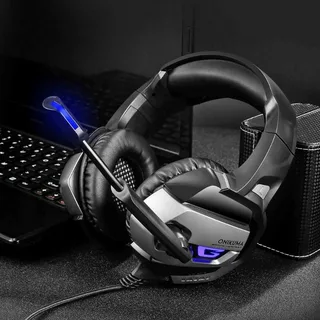
For multiplayer games, the microphone is equally important. Gaming headsets with microphone allow players to communicate clearly with teammates, coordinate strategies, share important information, and respond quickly during matches. A headset with a reliable microphone can therefore be useful for both casual conversations and competitive gaming, especially when clear communication is essential.
Comfort should also be considered when choosing a gaming headset. Gamers frequently spend several hours playing, and an uncomfortable headset can become distracting over time. Lightweight construction, soft ear cushions, an adjustable headband, and appropriate clamping pressure can all contribute to a more comfortable gaming experience.
Wired vs. Wireless Gaming Headsets
One of the first decisions buyers face is whether to choose a wired or wireless model. Both options have advantages, and the right choice depends on personal preferences and the gaming setup.
Wired Headsets
Wired headsets connect directly to a computer, console, controller, or another compatible device. Common connection methods include 3.5mm audio, USB, and USB-C.
One advantage of wired models is that they do not require battery charging. Players can use them for long sessions without worrying about battery life. Wired connections can also provide a straightforward setup, especially for users who prefer plug-and-play functionality.
Another advantage is consistent connectivity. There is no wireless battery to monitor and no need to pair the headset before use. For players who have a fixed gaming station, a wired headset can be a practical option.
The main drawback is cable management. A cable can become inconvenient when players move around frequently or have a gaming setup where wires are difficult to organize.
Wireless Headsets
Wireless models offer greater freedom of movement because there is no traditional audio cable connecting the headset to the gaming device. Depending on the model, wireless connectivity may use technologies such as 2.4 GHz wireless or Bluetooth.
Wireless headsets can be particularly useful for players who want a cleaner gaming setup. They also make it easier to move away from a desk without removing the headset.
However, wireless models need to be charged. Battery life therefore becomes an important consideration. Buyers should check the manufacturer’s stated battery performance and consider how frequently they normally play.
Compatibility Should Come First
Before buying a headset, it is important to confirm that it works with the intended gaming platform. A headset may offer excellent audio quality but still be inconvenient if it does not provide the required connection or features.
PC gamers often have access to a wide range of connectivity options, including USB, USB-C, 3.5mm, Bluetooth, and dedicated wireless receivers. Some PC-focused headsets also include software that allows users to adjust equalizer settings, microphone options, lighting, and other features.
Console compatibility requires additional attention. Players using PlayStation, Xbox, or Nintendo Switch should check whether the headset specifically supports their console. Some models may work across multiple platforms, while others are designed for a particular ecosystem.
Mobile gamers should also consider whether the headset supports their phone or tablet. Bluetooth can be convenient for compatible mobile devices, while wired USB-C models may also be suitable depending on the device.
Sound Quality and Audio Detail
Sound quality is one of the most important characteristics of a gaming headset. However, better gaming audio is not simply about having the strongest bass.
A balanced sound profile can help players distinguish different elements of a game’s audio. Strong bass may make explosions and music feel more powerful, while clear midrange frequencies can help dialogue and voice communication remain understandable.
Treble can also contribute to detail. In competitive games, players may want to hear subtle sounds such as footsteps, reloads, or distant movements.
Some gaming headsets offer spatial audio or virtual surround sound. These technologies attempt to create a sense of direction, making it easier to identify where certain sounds are coming from. The usefulness of these features can vary depending on the game, platform, and implementation.
The Importance of a Good Gaming Microphone
A headset’s microphone is especially important for multiplayer gaming. A poor microphone can make communication difficult, particularly when teammates are trying to coordinate during fast-paced matches.
Look for features such as noise reduction, microphone monitoring, mute functionality, and adjustable positioning. Some headsets have detachable microphones, while others use retractable or flip-to-mute designs.
A microphone does not necessarily need to be studio quality for gaming. What matters most is that voices are understandable and background noise does not make communication unnecessarily difficult.
Players who stream gameplay or create gaming content may want to pay extra attention to microphone performance. In these cases, a headset microphone can be convenient, although dedicated microphones may provide additional control for creators.
Comfort for Long Gaming Sessions
A headset that sounds excellent can still be a poor choice if it becomes uncomfortable after an hour of use.
When comparing different models, pay attention to weight, ear-cup design, headband padding, and the materials used for the cushions. Memory foam and breathable fabrics can help improve comfort during extended sessions.
The size and shape of the ear cups also matter. Over-ear designs generally surround the ears rather than resting directly on them. This can provide a comfortable fit for many users, although individual preferences vary.
Clamping force should also be considered. A headset that is too loose may move around during gameplay, while excessive pressure can become uncomfortable over time.
Noise Isolation and Noise Cancellation
Gamers often play in environments with background noise. Conversations, televisions, fans, traffic, and other sounds can interfere with concentration.
Passive noise isolation comes from the physical design of the headset and its ear cushions. A good seal around the ears can reduce some outside sounds without requiring electronic processing.
Active noise cancellation, commonly called ANC, uses electronic processing to reduce certain external sounds. It can be useful for players who frequently game in noisy environments.
Microphone noise reduction is a separate feature. It focuses on reducing unwanted background sounds picked up by the microphone rather than sounds reaching the player’s ears.
Understanding this difference can help buyers avoid confusing listening-side noise cancellation with microphone noise reduction.
Choosing a Headset for PC Gaming
PC gamers generally have a wide range of headset choices. Compatibility is usually less restrictive than on some consoles, and gaming software can provide additional customization.
A PC-focused headset may offer features such as virtual surround sound, equalizer controls, customizable microphone settings, RGB lighting, and multiple connectivity options.
Players who participate in competitive PC gaming may want to prioritize low latency, positional audio, microphone clarity, and comfort. Meanwhile, casual PC gamers may prefer a simpler model that provides good sound without unnecessary features.
Content creators and streamers may also benefit from headsets with reliable microphones and software customization.
Choosing a Headset for PlayStation
PlayStation players should check compatibility before purchasing. A suitable headset can provide immersive audio and useful communication features for multiplayer games.
Spatial audio can be particularly interesting for players who enjoy games designed around directional sound. Hearing where an approaching enemy or environmental effect originates can add another layer to gameplay.
Wireless connectivity can also be convenient for console gaming because it reduces cable clutter around the entertainment area.
Choosing a Headset for Xbox
Xbox players should pay close attention to compatibility and connection methods. Some headsets are designed specifically for Xbox consoles, while others support multiple platforms.
Players should check whether features such as game/chat balance, microphone controls, and wireless connectivity work correctly with their specific console.
For users who play both Xbox and PC, a multi-platform headset can potentially simplify the setup by allowing one headset to be used across different devices.
Nintendo Switch Gaming Headsets
Nintendo Switch players often have different requirements because the console can be used both docked and handheld.
A lightweight headset can be particularly convenient for handheld gaming. Wired models can provide simple plug-and-play connectivity, while compatible wireless options can offer greater freedom.
A detachable microphone may also be useful for players who switch between single-player and multiplayer gaming.
Features That Competitive Gamers Should Consider
Competitive gaming places greater demands on audio equipment. Small details can sometimes become important during fast-paced matches.
Players should consider:
- Positional audio
- Low-latency connectivity
- Clear microphone performance
- Comfortable ear cushions
- Reliable controls
- Good sound separation
- Lightweight construction
- Platform compatibility
For competitive games, extremely powerful bass is not always the priority. Being able to distinguish individual sounds may be more useful than simply making every effect louder.
Understanding Headset Drivers
Drivers are the components inside the ear cups that produce sound. Gaming headsets are available with different driver sizes and technologies.
Larger drivers are sometimes associated with a broader and more powerful sound presentation, but driver size alone does not determine overall audio quality. Tuning, materials, enclosure design, software processing, and other components also affect performance.
Instead of choosing a headset based only on driver size, buyers should consider the complete audio design and how it matches their gaming preferences.
What Is Surround Sound?
Surround sound features are designed to create a wider sense of audio positioning. Virtual surround technologies can simulate sounds coming from different directions.
This can be useful in games where directional awareness matters. For example, players may want to identify whether an audio cue comes from the left, right, front, or behind them.
However, surround processing is not automatically better for every player or every game. Some users prefer stereo audio because they find it more natural or consistent.
The best approach is to consider whether the games you play can take advantage of spatial audio and whether you personally find the feature useful.
Build Quality and Durability
A headset is an investment, so build quality should not be overlooked. Gaming headsets are frequently moved, adjusted, stored, and transported.
Look for durable construction around the headband, hinges, ear cups, and cable connections. If choosing a wireless headset, the charging port and included wireless accessories should also be considered.
Replaceable ear cushions can be another useful feature because cushions can wear down over time. A headset with replaceable components may be easier to maintain for long-term use.
Do Expensive Headsets Always Perform Better?
Price is not always a direct indicator of whether a headset will suit a particular gamer. Headsets for different needs can vary widely in price depending on the features they offer. Premium models may include additional features such as advanced wireless connectivity, better materials, customizable software, improved microphones, multiple connection modes, or enhanced spatial audio.
However, a less expensive headset can still meet the needs of a casual gamer. The key is to identify the features that actually matter for your gaming habits. Someone who plays casually for a few hours each week may not need every premium feature, while a competitive player, streamer, or esports enthusiast may have different requirements.
How to Compare Different Gaming Headsets
Instead of comparing headsets based only on brand or price, create a simple checklist.
First, identify the platform you use. Next, decide whether you prefer wired or wireless connectivity. Then consider microphone quality, comfort, audio characteristics, battery life, and additional features.
It is also helpful to think about where you normally play. A headset used at a quiet desk may have different requirements from one used in a shared room.
Reading product specifications and independent reviews can also help buyers understand what a headset actually offers.
Final Thoughts
Choosing the right headset is about matching features with personal gaming requirements. There is no single design that works perfectly for every player.
Wired models can be practical for gamers who prefer simple connectivity and do not want to manage batteries. Wireless models can provide greater freedom and a cleaner setup. PC players may appreciate software customization, while console gamers should prioritize platform compatibility.
Sound quality, microphone performance, comfort, durability, connectivity, and noise management should all be considered before making a purchase.
For players exploring different options, browsing a dedicated Gaming Headsets collection can make the comparison process easier. A well-organized selection allows gamers to compare different designs, connectivity types, brands, and features before deciding which headset fits their setup.
Ultimately, the best headset is not necessarily the most expensive one. It is the one that provides the right combination of audio performance, comfort, communication, compatibility, and features for the way you play.