Choosing a forex trading platform can look simple until you begin comparing the details. Most platforms allow you to view charts, place orders, monitor positions and apply technical indicators, so it is easy to assume that they all provide roughly the same experience.
In practice, the differences become much more important once you consider how you actually trade.
A trader who manually analyzes short-term price movements may prioritize charting, order management and market visibility. Someone running automated strategies may care more about programming support, backtesting and the availability of established trading tools. A beginner may simply want a platform that is easy to understand without sacrificing features they may need later.
That is why choosing a trading platform should not begin with popularity or appearance. It should begin with your trading workflow.
Start With Your Trading Style
Before comparing platform features, determine how you expect to use the platform.
Manual traders spend much of their time interacting directly with charts, watchlists and order tickets. They may repeatedly move between instruments, change timeframes, draw technical levels and adjust stop-loss or take-profit orders.
Algorithmic traders have different priorities. Their platform may spend more time running automated systems than being manually operated. Programming languages, strategy testing, optimization tools and the availability of existing trading robots become much more important.
Longer-term traders may care less about rapid order entry and more about stability, chart organization and access across different devices.
There is therefore no universally suitable platform for every trader. The most useful platform is the one that supports the way you intend to research, enter, manage and review trades.
1. Look Beyond the Number of Indicators
Technical indicators are often one of the first specifications traders compare. However, simply counting indicators does not tell you how effective a platform will be for analysis.
A better evaluation should consider:
- Available chart types
- Supported timeframes
- Drawing and annotation tools
- Multi-chart layouts
- Chart customization
- Detachable or multi-screen charts
- Custom indicator support
- Saving and synchronizing workspaces
A platform with fewer indicators but a well-designed charting environment may be more practical than one with a huge library that is difficult to organize.
This distinction becomes particularly important for day traders and scalpers. They frequently monitor several instruments and timeframes simultaneously, meaning workflow efficiency can matter as much as individual analytical tools.
Before committing to a platform, build the chart layout you would normally use and see whether it remains practical during an active trading session.
2. Examine Order Management Carefully
Trading platforms are not simply charting applications. Their most important function is ultimately sending and managing orders.
Most major platforms provide the standard order types needed for forex trading, including market and pending orders. The differences become clearer when you examine how those orders are created and managed.
Useful features can include:
- One-click trading
- Stop-loss and take-profit controls
- Trailing stops
- Stop-limit orders
- Chart-based order modification
- Partial position management
- Risk and position-size calculations
- Detailed trade information
- Market depth
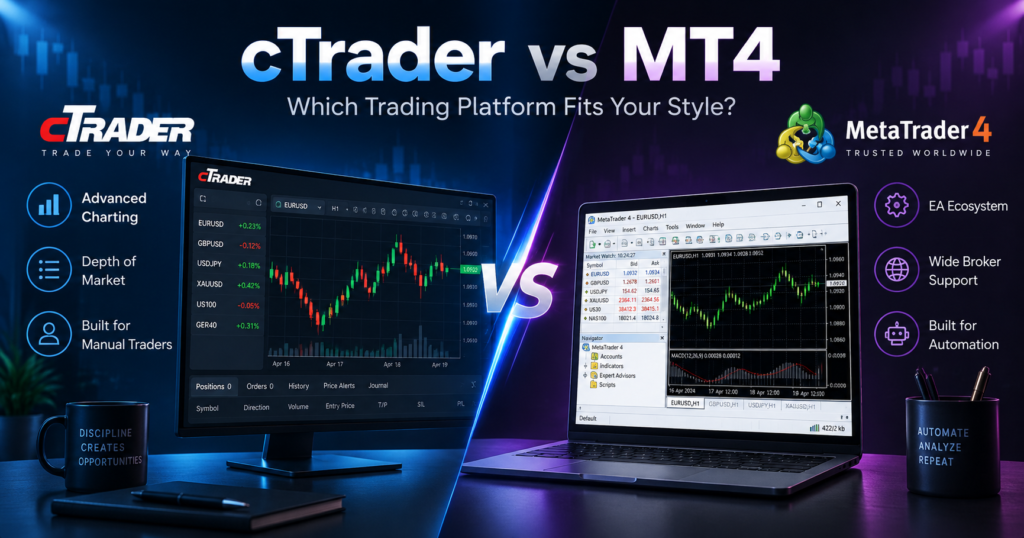
For example, cTrader provides dedicated depth-of-market functionality that can display available liquidity at different price levels. It also offers multiple order-entry and position-management tools directly within its trading interface.
MT4 takes a more traditional approach. Its core order functionality remains straightforward, while additional capabilities can often be added through scripts, Expert Advisors, indicators or broker-specific tools.
Neither approach automatically produces better trading results. The question is whether the order workflow gives you the level of control your strategy requires.
3. Separate Platform Speed From Broker Execution
One of the most misunderstood areas of platform comparison is execution speed.
A trading platform is only one part of the order-execution process.
The final result can also depend on:
- Your internet connection
- Distance from trading servers
- Broker infrastructure
- Liquidity conditions
- Order size
- Market volatility
- Execution model
- Available prices when the order reaches the market
This means it is misleading to assume that choosing a particular platform automatically guarantees faster fills or lower slippage.
A modern interface may process commands efficiently, but the broker still plays an important role in what happens after the order is submitted.
This is especially important for strategies that depend on frequent entries and exits. Scalpers, news traders and other short-term participants should evaluate real execution conditions rather than relying only on advertised platform speeds.
Demo testing can help assess usability, although demo execution may not perfectly reproduce live-market liquidity or slippage.
4. Consider How Much Automation You Need
Automation is one of the clearest differences between major forex platforms.
MetaTrader 4 has built a large ecosystem around Expert Advisors, commonly known as EAs. These programs are created with MQL4 and can automate trading rules, monitor markets and manage positions.
MT4 also includes tools for testing and optimizing automated strategies using historical data.
Its longevity has created another significant advantage: ecosystem size. Traders can access a substantial selection of existing Expert Advisors, custom indicators, scripts and educational resources.
cTrader takes a different approach to algorithmic trading. Its automation environment supports cBots and modern development workflows, including widely used programming technologies. It also provides backtesting, optimization and cloud-based execution capabilities for supported automated strategies.
For traders evaluating these two ecosystems specifically, a detailed cTrader vs MT4 comparison can help clarify how their charting, automation, execution tools and overall workflows differ.
The important point is not simply whether a platform supports automated trading. You should determine how easily your existing or planned strategy can operate within its ecosystem.
5. Evaluate the Ecosystem, Not Just the Software
A platform can remain relevant long after newer alternatives appear because trading software does not exist in isolation.
Popular platforms develop ecosystems around them.
These can include:
- Custom indicators
- Automated strategies
- Scripts
- Developer communities
- Tutorials
- Trading utilities
- Signal integrations
- Broker support
- Third-party analytical tools
MT4 is a strong example of this network effect. Its long history means traders can access an extensive collection of existing tools and educational material.
A newer platform may offer a more contemporary interface or advanced built-in functionality, but traders with years of customized tools may face significant switching costs.
Consider what you already use before moving platforms.
If your trading process depends on a specific indicator, script or automated strategy, confirm that an equivalent is available or can be developed before making the change.
6. Test Desktop, Web and Mobile Separately
A platform that works well on a desktop computer may provide a very different experience on a smartphone.
This matters because many traders now monitor positions across several devices.
When testing mobile and web versions, check whether you can comfortably:
- View and modify positions
- Create pending orders
- Adjust risk controls
- Analyze charts
- Change timeframes
- Use technical indicators
- Manage watchlists
- Receive alerts
- Access multiple accounts
Also consider synchronization.
Having charts or settings available across devices can reduce setup time when moving between your primary workstation, browser and phone.
However, mobile trading should generally be considered part of a broader workflow rather than a reason to ignore careful analysis. Smaller screens can make detailed chart analysis and complex order management more difficult.
7. Do Not Assume the Platform Determines Trading Costs
Another common mistake is comparing platforms based on spreads or commissions without separating the platform from the broker.
Trading costs are generally determined by the broker and account structure rather than the trading interface itself.
Depending on the account, costs can include:
- Bid-ask spreads
- Trading commissions
- Overnight financing
- Currency-conversion charges
- Account-related fees
Two traders using the same platform through different brokers can therefore face different trading conditions.
Similarly, one broker may offer several account structures using the same platform.
When comparing platforms, evaluate their functionality separately from broker pricing. Then compare the actual costs attached to the account you intend to use.
8. Check Broker Availability Before Building Your Workflow
A technically impressive platform has limited value if suitable brokers do not provide it in your country or under the account conditions you need.
MT4 has historically benefited from broad broker adoption, which gives traders considerable flexibility when comparing providers.
cTrader is also offered by a range of forex and CFD brokers, although availability can vary by company, legal entity and jurisdiction.
Before learning a platform in depth, confirm that the broker you are considering actually provides it to clients in your location.
You should also verify the legal entity that would hold your account and check its regulatory status independently. Platform availability should never replace normal broker due diligence.
9. Pay Attention to Risk-Management Workflow
Risk management is not simply about having a stop-loss button.
A practical platform should make it easy to understand the exposure you are creating before and after an order is placed.
Useful questions include:
Can you clearly see your position size?
Can you set stop-loss and take-profit levels during order entry?
Can you modify those levels without unnecessary steps?
Can you monitor margin and account exposure easily?
Can you review trading history in enough detail to analyze previous decisions?
These features do not prevent losses, but a clear interface can make it easier to follow a structured process.
Complexity can become a problem when traders are forced to navigate multiple menus during fast-moving markets. A platform that matches your workflow can reduce operational friction, although it cannot remove market risk.
10. Use a Demo Account as a Platform Test
A demo account is useful for more than learning how to place your first trade.
It can be treated as a platform evaluation environment.
Instead of randomly opening positions, reproduce your normal trading process.
Create your preferred watchlist. Build several chart layouts. Add the indicators you use. Place different order types. Adjust stops and targets. Test alerts. Try the mobile application. If automation matters to you, investigate how strategies are created, tested and operated.
Then ask a simple question:
Does the platform make your trading process easier or more complicated?
That answer is often more useful than comparing dozens of specifications.
Remember, however, that demo trading cannot fully reproduce live conditions. Real-market execution, liquidity, slippage and emotional decision-making can differ once actual capital is involved.
A Practical Platform Selection Checklist
Before settling on a platform, review the following:
Trading style: Does it suit manual, automated, short-term or longer-term trading?
Charting: Are the available charts and analytical tools sufficient for your strategy?
Orders: Can you enter and manage trades efficiently?
Automation: Does it support the programming language and tools you need?
Ecosystem: Are indicators, scripts and educational resources readily available?
Broker availability: Can you use the platform with an appropriate broker in your jurisdiction?
Cross-device access: Are desktop, web and mobile versions suitable for your workflow?
Risk controls: Can you manage position size, stops and exposure clearly?
Testing: Can you test the platform thoroughly before committing real capital?
If several of these areas create friction, the platform may not be the right fit even if it is highly popular.
Final Thoughts
The debate over forex trading platforms often focuses on which platform has more indicators, newer technology or greater market adoption. Those comparisons can be useful, but they overlook the most important factor: how the platform fits the trader.
Manual traders may prioritize clean charts, flexible workspaces, market information and efficient order management. Algorithmic traders may care more about programming tools, strategy testing and the size of the automation ecosystem. Beginners may prioritize intuitive navigation and educational resources, while experienced traders may value compatibility with an established setup.
Platform choice should also be separated from broker choice. Execution quality, spreads, commissions, available instruments and regulatory protections can depend heavily on the broker and account rather than the trading software alone.
The best approach is therefore practical: define how you trade, identify the features your process genuinely requires, test the available platforms carefully and evaluate the broker behind the platform before opening a live account.
Risk Warning: Forex and CFD trading involves substantial risk and may not be suitable for every investor. Leverage can magnify both gains and losses. Always understand the products, costs and risks involved before trading with real money.