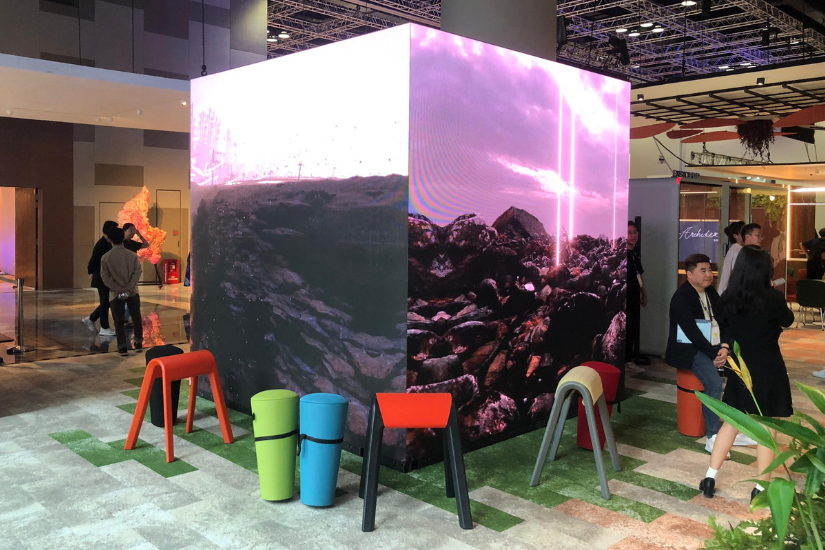
Digital display technology continues to transform how businesses communicate with audiences, particularly in advertising, retail, exhibitions, and live events. While traditional displays present content on a single flat surface, three-dimensional LED cubes introduce new creative possibilities by displaying visuals across multiple faces. These installations can showcase animated products, geometric effects, branded content, and immersive visual sequences that attract attention from different viewing angles.
However, creating effective content for a 3D LED cube requires more than uploading a standard video. Designers must understand screen dimensions, pixel resolution, surface orientation, content mapping, and playback synchronisation to ensure that visuals appear correctly across every face. A conventional led screen typically uses a rectangular canvas, whereas an led cube display requires carefully coordinated content for multiple physical surfaces.
This guide explains how multi-surface video rendering works, the technical considerations involved, and how businesses can create engaging content for 3D LED cube installations.
What Is Content Mapping for 3D LED Cubes?
Content mapping is the process of adapting digital visuals to match the physical dimensions and arrangement of a display. For a 3D LED cube, this involves assigning specific portions of a video or animation to individual display faces.
Each face may have its own resolution, orientation, and signal input. The content must be configured so that every section appears in the correct position when displayed on the physical structure.
For example, an animation showing a rotating product may begin on the front face, continue across the side, and appear to move around the cube. Achieving this effect requires accurate alignment between the animation and the display’s geometry.
Content mapping also helps prevent visual problems such as stretched images, misaligned edges, inconsistent proportions, and unexpected gaps between adjoining surfaces.
1. Understanding the Physical Structure of an LED Cube
Before creating any video content, designers need to understand the display’s physical configuration.
Identify the Active Display Faces
An LED cube may feature several active sides, depending on its construction. Some installations display content on three visible faces, while others incorporate four or more sides.
The number of active faces determines how the video canvas should be arranged. Designers should confirm which surfaces will display content and whether the structure includes inactive areas, mounting sections, or concealed panels.
This information helps establish the correct layout before animation work begins.
Confirm Screen Dimensions and Resolution
Each display face has specific physical dimensions and a corresponding pixel resolution. These measurements determine how much visual information can be displayed without distortion.
For example, a cube with four active faces may require four separate content regions, each matched to the resolution of its corresponding panel.
Designers should obtain the manufacturer’s technical drawings, pixel dimensions, and cabinet layout before producing the final video. Guessing the dimensions can lead to unnecessary revisions and poor visual alignment.
2. Choosing the Right Content Mapping Method
Different projects require different mapping approaches. The appropriate method depends on the display controller, the number of active surfaces, and the complexity of the animation.
Individual Surface Mapping
Individual surface mapping treats each face as a separate display area. Designers prepare content for each surface and assign it to the corresponding output.
This method works well when different messages or visual elements appear on different sides of the cube.
For example, a retail campaign could display a product video on the front face, promotional text on the left face, and brand imagery on the right face.
The main advantage is control over the content shown on each surface. However, designers must maintain consistent branding and timing across the different video segments.
Unified Canvas Mapping
Unified canvas mapping treats multiple display faces as sections of a larger composition. The content is created as one coordinated layout and then mapped to the appropriate physical surfaces.
This method is useful for animations that appear to travel around the cube or connect visual elements across multiple faces.
However, a unified video canvas does not automatically produce correct output. The playback system must map each region to the appropriate display face and account for its physical orientation.
3D Model-Based Mapping
For more complex installations, designers can create a digital 3D model that represents the physical cube.
The model helps visualise how animations, products, and graphics will appear when rendered across multiple surfaces. Designers can preview perspective, transitions, and object movement before deploying the final content.
This approach is particularly useful for product launches, experiential marketing, and installations that require sophisticated three-dimensional effects.
3. Preparing Video Content for Multi-Surface Rendering
Design for the Shape of the Display
A standard rectangular video may not translate effectively to a cube-shaped screen. Important visual elements could fall across corners, appear incorrectly oriented, or become difficult to recognise.
Instead, designers should develop the composition around the display’s geometry.
For example, a virtual object can be animated to rotate around the cube, while a branded graphic can be positioned so that its main elements remain visible from the intended viewing directions.
The content should be tested on a preview model or through a suitable simulation before it is shown on the actual installation.
Use Suitable Resolution and Aspect Ratios
Video resolution should match the technical requirements of the display and playback equipment. Exporting a video at an arbitrary resolution may introduce scaling problems or reduce image clarity.
Designers should confirm the pixel dimensions of every active face and the supported input formats of the controller.
High-resolution source material is useful when detailed graphics are required, but the final output must still match the physical display configuration.
Plan Transitions Between Faces
Transitions are especially important when animations cross the edges of a cube.
A moving object should appear to continue naturally from one face to another. If the mapping is incorrect, the object may jump, become distorted, or appear to disappear briefly.
Designers can reduce these issues by coordinating animation timing, edge positions, pixel coordinates, and surface orientation.
For more complicated effects, test sequences should be reviewed from several viewing angles rather than from the front alone.
4. Selecting the Right Playback and Processing System
The media player or video processor is responsible for delivering the content to the correct display surfaces. Its capabilities affect resolution, playback synchronisation, and the number of supported outputs.
Some installations can use a single processor with multiple outputs, while others require additional equipment depending on their resolution and configuration.
Before choosing a system, confirm that it supports the number of active faces, the required input formats, the intended refresh rate, and the overall pixel load.
Synchronisation is particularly important when a single animation spans several surfaces. If the outputs are not properly coordinated, movement may appear inconsistent at the edges.
Businesses should work with their display supplier to confirm hardware compatibility and the correct signal-routing configuration.
5. Common Content Mapping Mistakes to Avoid
Ignoring Surface Orientation
A video can appear upside down, reversed, or incorrectly rotated if the physical orientation of a face is not considered.
Every surface should be labelled clearly in the content plan, including its viewing direction and assigned output.
Using Incorrect Pixel Dimensions
Incorrect resolution settings can cause stretched images, blank areas, or content cropping. Always verify the exact pixel dimensions before exporting the final files.
Placing Important Content Near Corners
Text, logos, and detailed product information may become difficult to read when positioned directly across an edge.
Keep essential messages on clearly visible areas of the display, and use corners primarily for visual transitions when appropriate.
Failing to Test the Complete Installation
A video that looks correct on a computer monitor may behave differently on the actual cube.
Test the complete installation for colour consistency, playback synchronisation, image alignment, brightness, and viewing-angle performance before the campaign launches.
6. Creating Effective Content for Commercial Applications
The most successful LED cube content combines technical accuracy with a clear communication objective.
Retail brands can use rotating product animations to highlight product features. Exhibition organisers can create branded visuals that attract visitors from different directions. Corporate events can use multi-surface graphics to support product reveals, announcements, and presentations.
The content should be designed around audience behaviour. If people approach from several directions, important visuals should remain understandable from multiple viewpoints. If the installation is positioned in a controlled viewing area, the animation can be designed around a more specific viewing angle.
A well-planned led screen campaign can deliver clear advertising messages, while a carefully mapped led cube display can transform those messages into a more distinctive multi-surface experience.
7. Optimising Performance and Maintaining Quality
After installation, businesses should establish a process for checking content quality and system performance.
Regularly inspect display alignment, colour consistency, signal connections, and playback reliability. Keep copies of approved content files, mapping configurations, and controller settings so that updates can be deployed consistently.
When changing animations, verify that the new content matches the existing display resolution and surface layout. Even small changes in screen configuration may require adjustments to the mapping setup.
For commercial installations, it is also important to coordinate content updates with the technical team to minimise downtime and avoid disrupting scheduled campaigns.
Conclusion
Content mapping is essential to creating effective visuals for 3D LED cubes. By understanding the physical structure, confirming pixel dimensions, choosing an appropriate mapping method, and coordinating playback across multiple surfaces, designers can produce seamless and engaging animations.
Successful multi-surface rendering depends on both technical preparation and creative planning. Screen geometry, surface orientation, resolution, and synchronisation must work together to ensure that content appears as intended.
Whether you are producing content for a conventional led screen or developing an advanced led cube display, the key is to design visuals around the actual hardware rather than treating every display as a standard rectangular canvas. With accurate mapping and thorough testing, businesses can deliver memorable digital experiences across retail, exhibitions, advertising, and live events.