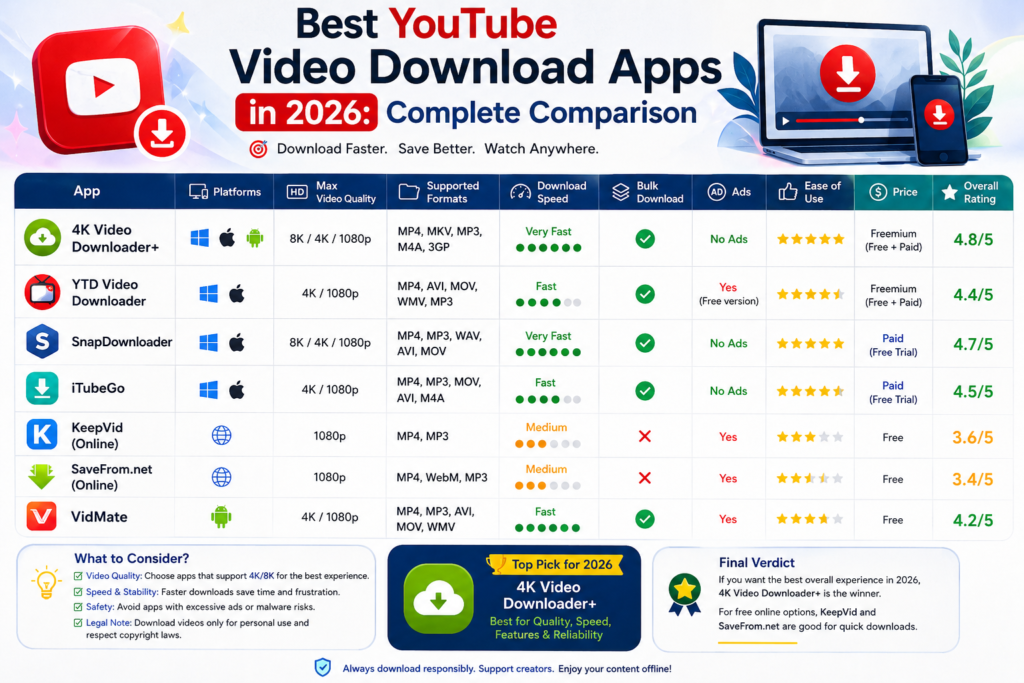
Whether you’re traveling, working with limited internet access, or simply want to save educational content for offline viewing, YouTube video downloaders remain popular in 2026. With dozens of applications available across Windows PCs, Android devices, and web browsers, choosing the right tool can be surprisingly difficult.
The best YouTube video download applications differ significantly in terms of speed, video quality, security, supported formats, and ease of use. Some are designed for power users who need batch downloads and format conversion, while others focus on simplicity and quick downloads.
This guide compares the leading options available in 2026 and explains which downloader is best depending on your needs.
Important: Downloading YouTube videos may violate YouTube’s Terms of Service unless the content is explicitly offered for download or you’re using approved offline features such as YouTube Premium. Always respect copyright laws and content creator rights.
Why People Still Use Video Downloaders in 2026
Despite improved internet speeds and streaming services, offline video access remains valuable.
Common reasons include:
- Watching videos during travel
- Saving educational tutorials
- Accessing content with limited internet
- Creating offline reference libraries
- Preserving publicly available content for personal use
Many professionals, students, and researchers continue to rely on offline access when internet connectivity isn’t guaranteed.
What Makes a Good YouTube Downloader?
Before comparing options, it’s important to understand the factors that separate quality tools from unreliable ones.
The best downloaders typically offer:
- Fast download speeds
- High-resolution video support
- Multiple file formats
- Audio extraction options
- Safe and clean installation
- Regular updates
- Minimal advertisements
Security is particularly important because many low-quality download tools bundle unwanted software or intrusive ads.
Best YouTube Video Download Applications for PC
1. 4K Video Downloader Plus
4K Video Downloader Plus remains one of the most trusted desktop solutions in 2026.
Key Features
- Downloads up to 8K resolution
- Playlist and channel downloads
- Subtitle support
- MP4 and MKV output
- Simple user interface
Best For
Users who want a balance between simplicity and advanced functionality.
Pros
- Beginner-friendly
- Excellent video quality
- Reliable performance
- Frequent updates
Cons
- Some advanced features require a paid license
2. JDownloader 2
JDownloader continues to be a favorite among advanced users.
Key Features
- Open-source software
- Supports numerous websites
- Automatic link detection
- Batch downloading
Best For
Power users managing large download libraries.
Pros
- Extremely flexible
- Free to use
- Supports automation
Cons
- More complex setup process
3. yt-dlp
For technical users, yt-dlp remains one of the most powerful options available.
Key Features
- Command-line interface
- Advanced customization
- High download reliability
- Frequent community updates
Best For
Developers and experienced users.
Pros
- Highly customizable
- Fast performance
- Open-source
Cons
- Steeper learning curve
Best YouTube Video Download Applications for Android
NewPipe
NewPipe remains one of the most recommended Android alternatives for privacy-conscious users.
Features
- No Google account required
- Background playback
- Audio downloads
- Lightweight performance
Advantages
NewPipe focuses on user privacy while providing offline functionality.
Limitations
Not available through the Google Play Store.
Seal
Seal has gained popularity among Android users due to its modern interface and integration with yt-dlp.
Features
- Video and audio downloads
- Playlist support
- Material Design interface
- Frequent updates
Best For
Users seeking a clean and modern Android downloader.
TubeMate
TubeMate remains one of the oldest and most recognizable names in video downloading.
Features
- Multiple format options
- Resolution selection
- Fast download speeds
Considerations
Users should download only from official sources to avoid counterfeit versions.
Best Online YouTube Video Downloaders
Online tools are attractive because they require no installation.
However, users should exercise caution since many web-based downloaders rely heavily on advertising.
SaveFrom-Style Services
These tools generally allow users to:
- Paste a YouTube URL
- Select a format
- Download directly
Benefits
- No installation
- Fast access
- Cross-platform compatibility
Drawbacks
- More ads
- Variable reliability
- Potential privacy concerns
Browser-Based Converters
Many web services now support:
- MP4 conversion
- MP3 extraction
- Mobile compatibility
While convenient, these services often face interruptions due to platform policy changes.
PC vs Android vs Online Downloaders
PC Applications
Desktop software generally provides:
- Better stability
- Faster speeds
- Higher quality options
- Batch downloads
PC tools are ideal for users who frequently download large amounts of content.
Android Apps
Android solutions offer convenience and portability.
They’re best suited for users who primarily consume content on mobile devices.
Online Tools
Online services work best for occasional downloads.
They eliminate installation requirements but usually offer fewer advanced features.
Comparison Table
| Feature | PC Applications | Android Apps | Online Tools |
| Installation Required | Yes | Yes | No |
| Download Speed | High | Medium-High | Medium |
| Batch Downloads | Excellent | Limited | Rare |
| Security | High (trusted apps) | Medium-High | Variable |
| Offline Access | Excellent | Excellent | Limited |
| Ease of Use | Medium | Easy | Very Easy |
| Advanced Features | Extensive | Moderate | Basic |
Which Option Is Best for Most Users?
For most people, desktop applications remain the strongest choice.
If you prioritize:
Reliability
Choose 4K Video Downloader Plus.
Flexibility
Choose JDownloader 2.
Advanced Control
Choose yt-dlp.
Android Simplicity
Choose NewPipe or Seal.
Quick Occasional Downloads
A reputable browser-based solution may be sufficient.
Security Tips When Using Download Tools
Not every downloader is trustworthy.
To stay safe:
- Download software from official websites
- Avoid suspicious pop-up ads
- Keep applications updated
- Use antivirus protection
- Avoid tools requesting unnecessary permissions
Many security issues arise from unofficial clones rather than legitimate applications.
How YouTube Premium Compares
For users who simply want offline viewing, YouTube Premium remains an official alternative.
Benefits include:
- Offline downloads within the YouTube app
- Ad-free viewing
- Background playback
- Cross-device synchronization
While it doesn’t provide downloadable video files, it offers a compliant solution for many users.
What Changed in 2026?
Several trends have influenced the downloader market:
- Stronger platform restrictions
- Improved mobile download tools
- Better support for high-resolution formats
- Increased focus on privacy
- More open-source development
As a result, users now have access to more powerful and user-friendly tools than ever before.
In discussions on technology communities and platforms like Bumppy, users increasingly prioritize privacy, security, and reliability over simply finding the fastest downloader.
Frequently Asked Questions
What is the best YouTube video downloader for PC?
4K Video Downloader Plus, JDownloader 2, and yt-dlp are among the most respected options in 2026.
Which downloader is best for Android?
NewPipe and Seal are widely recommended due to their performance, privacy features, and active development.
Are online YouTube downloaders safe?
Some are safe, but many contain aggressive advertising. Users should be cautious and use trusted services.
Can I download entire playlists?
Many desktop applications support playlist downloads, including 4K Video Downloader Plus and JDownloader 2.
Is yt-dlp still available in 2026?
Yes. yt-dlp remains actively maintained and is considered one of the most powerful downloading tools available.
Does YouTube Premium allow downloads?
Yes, but downloads remain inside the YouTube app rather than being saved as independent video files.
Are YouTube downloaders legal?
Legality depends on local laws, copyright status, and how the content is used. Users should comply with copyright regulations and platform terms.
Conclusion
The best YouTube video download applications in 2026 depend largely on your device and usage preferences. Desktop users generally benefit most from powerful tools like 4K Video Downloader Plus, JDownloader 2, and yt-dlp, while Android users often prefer NewPipe or Seal for their simplicity and privacy-focused design.
Online downloaders remain useful for occasional use, but they typically can’t match the reliability and functionality of dedicated applications. Regardless of which solution you choose, prioritizing security, legality, and content creator rights is essential.
As video consumption continues to evolve, having the right offline viewing solution can make accessing educational, professional, and entertainment content far more convenient.