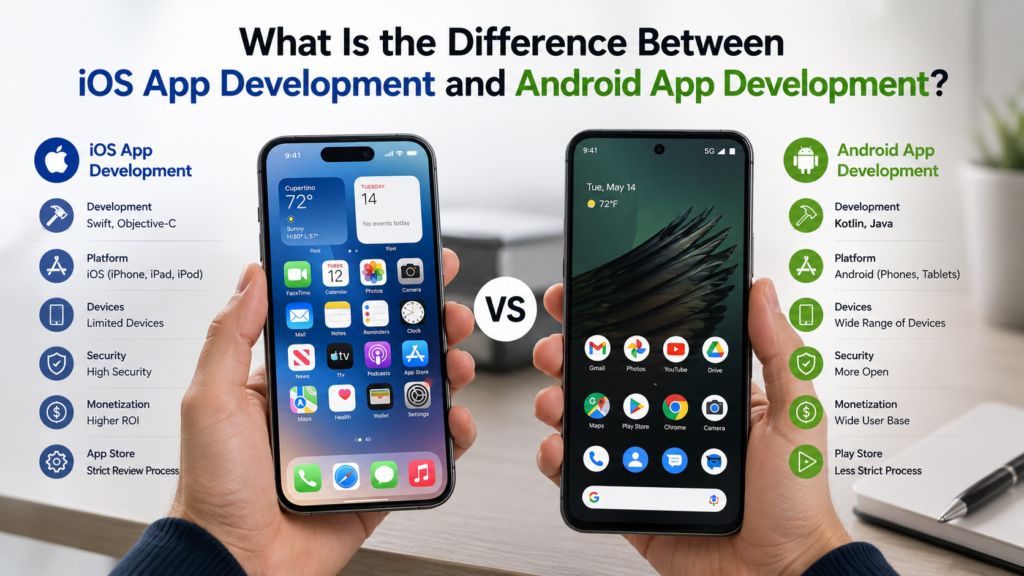
iOS App Development vs Android App Development
Daniel runs a consumer app startup. When he started talking to development teams about his idea, a loyalty rewards platform for independent coffee shops, the first question almost every agency asked him was: iOS first or Android first? He hadn’t thought much about it. He used an iPhone himself, so iOS felt natural. His co-founder had an Android. His target market was independent cafe owners and their customers, and he had no data on what devices that audience used. The question that seemed simple turned out to require actual research, and the answer shaped the project timeline, the development approach, and the tools the team used. Any experienced iOS app development company or Android App Development company will tell you that iOS-or-Android isn’t just a preference question. It’s a technical and strategic decision with downstream consequences worth understanding before committing to either.
The Language Difference, and Why It Matters
Native iOS apps are written in Swift, Apple’s modern programming language introduced in 2014, or occasionally still in Objective-C for legacy codebases. Swift is expressive, type-safe, and designed specifically for Apple’s ecosystem. Native Android apps are written in Kotlin, which became Google’s preferred Android language in 2017, or in Java, which still has significant presence in older codebases and enterprise development.
Swift and Kotlin are not interchangeable. A developer who writes iOS apps in Swift and a developer who writes Android apps in Kotlin have overlapping conceptual knowledge about mobile development but are working in different languages, different IDEs, and different ecosystems. A Swift developer cannot simply sit down and ship an Android app without learning a new language, a new development environment, and a new set of platform conventions. This is why native iOS and native Android development are genuinely separate disciplines despite both being “mobile development.”
Ecosystem and Development Environment
iOS development happens inside Xcode, Apple’s IDE, which runs only on macOS. This is a hard requirement: you cannot build a native iOS app on a Windows or Linux machine. iOS developers need an Apple computer, full stop. The Apple Developer Program costs $99 per year and is required for App Store distribution.
Android development happens inside Android Studio, Google’s IDE, which runs on macOS, Windows, and Linux. This cross-platform availability makes Android development more accessible to developers across different hardware setups. The Google Play Developer account is a one-time $25 fee, significantly lower than Apple’s annual cost.
These differences affect team setup in practical ways. An agency building native for both platforms needs developers with Mac hardware regardless, but individual Android developers working on a cross-platform project from Windows machines don’t need to switch hardware. For startups thinking about bringing development in-house eventually, Android removes a hardware barrier that iOS doesn’t.
Android App Development Tools
The tooling ecosystem here has matured considerably over the last several years. Android Studio is the primary IDE, built on IntelliJ IDEA, and includes an emulator for testing across different device configurations, a layout editor, a profiler for performance analysis, and Gradle-based build tooling. Jetpack Compose, Google’s modern declarative UI framework, has shifted significantly how Android UIs get built, replacing older XML-based layout files with a component model that will feel familiar to developers coming from React.
Firebase, Google’s mobile backend platform, integrates deeply with Android and provides authentication, real-time database, cloud storage, analytics, and crash reporting. The Firebase ecosystem is available for both platforms but has historically had tighter tooling integration on Android. Google Play’s testing infrastructure, including pre-launch reports that automatically test an app against common Android devices, is another tooling advantage that doesn’t have a direct equivalent in the Apple ecosystem.
Best Frameworks for iOS App Development
The picture here has shifted in recent years, with SwiftUI now being Apple’s preferred framework for building native UIs. SwiftUI uses a declarative syntax, similar in concept to Jetpack Compose on Android and React on the web, and has been Apple’s strategic direction since 2019. For apps targeting iOS 15 and above, SwiftUI is increasingly the practical default for new development.
UIKit, the older imperative framework, remains relevant because a huge amount of existing iOS code is built on it and because some complex UI requirements still benefit from UIKit’s maturity and the breadth of existing third-party components built around it. Many iOS apps use a hybrid approach, SwiftUI for new screens and UIKit where an existing component ecosystem is needed or where SwiftUI’s limitations in specific areas create friction.
Beyond UI frameworks, Combine for reactive programming, Core Data and SwiftData for local persistence, and WidgetKit for home screen widgets are all significant parts of the iOS development ecosystem that Android has equivalent but distinct answers to.
The Fragmentation Problem
Android has a device fragmentation challenge that iOS doesn’t. Apple controls both the hardware and the software, so iOS updates roll out to supported devices predictably and adoption rates for new iOS versions are high within the first few months of release. This means iOS developers can target relatively recent OS versions without losing significant user share.
Android runs on thousands of different device models from dozens of manufacturers, with varying screen sizes, processor capabilities, memory constraints, and manufacturer-specific software customizations. Google’s own Pixel devices get timely updates, but a budget Samsung or Xiaomi running a carrier-modified Android build might still be on a two-year-old OS version because the manufacturer hasn’t shipped an update and the carrier hasn’t approved it. Android developers test across a much wider range of device configurations, and QA processes need to account for behavior differences across that device diversity.
Distribution and Review Processes
Apple’s App Store review process is stricter and less predictable than Google Play’s. Apps frequently get rejected for policy violations that weren’t always clearly documented in advance, review times can run several days, and getting a rejection at the final stage of a launch timeline is a known risk that experienced iOS teams build buffer into their schedules for. This control means the App Store has a lower incidence of malicious or low-quality apps, but it also means more friction for developers shipping legitimate software.
Google Play’s review process is more automated and generally faster, though Google has tightened its policies considerably in recent years. New developer accounts sometimes face additional scrutiny, and policy changes have affected entire categories of apps with relatively short notice. Both stores require compliance with increasingly detailed requirements around data privacy disclosures, permissions, and in-app purchase implementations.
What Daniel Chose and Why
He researched his target market properly before deciding. Independent cafe owner demographics in his region skewed slightly Android, but the early-adopter customer segment he was targeting first, younger urban coffee drinkers, skewed iOS. He launched iOS first, using a team experienced in Swift and SwiftUI, with a plan to build the Android version six months later using React Native to share logic across platforms rather than building a second native codebase from scratch. That sequencing let him validate the core product faster on the platform where his early users were most concentrated, without permanently locking out the Android audience.
The iOS-or-Android decision is rarely about which platform is better. It’s about where your users are, what your budget allows, and what sequencing makes the most sense for the specific product. Getting that decision right before development starts is worth whatever research it takes.